
Enhance photos with this simple editor
Enhancing photos is an essential part of any professional photographer's day and while this is no professional tool by a long stretch, it gives amateurs a chance to add enhance their photos in a professional manner.
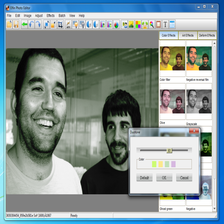
Pos Free Photo Editor is a very simple, free and user friendly photo editor that allows you to easily view and enhance your photos. In terms of flexibility, it accepts just about any conceivable format so no conversions are required. There's very little to pick up or learn with the program - most of the learning is done on the job via trial and error with the handy preview function. The enhancements are mainly focused around changing the focus and altering the colours of your photos although you can't shift photos on their axis which is a bit annoying if you've taken a slightly badly angled photo.
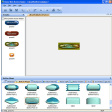
What it's really useful for though is creating collages. You can add multiple images to the same sheet meaning you can print them all out on one page. This not only allows you to create some pretty impressive designs but it saves on printing out multiple images on expensive photos and then sticking them together.
Pos Free Photo Editor is a far cry from Photoshop but it's completely free and allows beginners to add simple enhancements and effects that are sure to improve your photos.






























User reviews about Pos Free Photo Editor
by Anonymous
@SaintlyMic.
Hi,After analyzing the file with Virus Total, the only thing I found was a "suspicious" file detected by McAfee - which could as well be a false positive, especially if you take into account that the two previous scans of the same file, done in April 2010, returned 0 results.http://www.virustotal.com/file-scan/report.html?id=596d1bcb9b6df1a9302b3fc7a4e5cd11895c204eb9ff446f44e1501cd5482e8c-1276679381Virus Total uses 41 different antivirus engines to analyze files, so obtaining a 1/41 result means the file has a 2,4% chance of really being infected.By the way, the Panda engine didn't find anything wrong with it.Cheers,
ElenaContent Editor
Softonic.com More
by Anonymous
3 Viruses and 1 Trojan!.
Panda Antivirus found 4 major problems within this program!
Please be careful because your antivirus may NOT warn you and remove the threats!
Pros:
None.
Cons:
This program would NOT function without the dangerous files. More